



If you follow me on twitter, you may have caught that I was not initially that excited about the iPad. Yes, I’m a Mac fanboy who even waited in line for an OS release and have done other silly Apple posts. After waiting in line to be one of the first to get an iPhone, and later reviewing it, and suffering through some of the early iPhone issues (even getting the $100 credit when they dropped the price!), I initially decided I would wait out the iPad rush.
My first evaluation was that this was a consumption device rather than a creative device, more for those who don’t already own a Mac and/or iPhone, and since I already have both, I saw no need for one. I liked the look and feel of it, but thought I had no need for one personally. I was in the “its just a giant iPod Touch” camp.
But I slowly caved for a number of reasons. First, I decided to get my wife one for her birthday (which was today) because I had given her aging laptop to a new employee last fall and it died and she needed something for around the house and travel for doing e-mail/calendar/facebook and basic computer tasks and the iPad seemed perfect: easier, faster, lighter and ideal for the mother of a four year old, especially around the house. Then came the realization that if she had one, I’d be playing with it all the time and she would be annoyed at me constantly for taking her iPad and that could lead to unhealthy marital tension, something worth avoiding at any cost. But the final straw came in the last two weeks as I came to the realization of just how much REAL WORK I actually do ON MY IPHONE! Seriously, I screen, respond and manage most of my e-mail on my iPhone, as well as basecamp (Kidology’s online project management solution), as well as many other things on my iPhone – all on a very small screen. It dawned on me that doing all this on a larger screen would be a dream.

Karl with his new iPad
Having only owned it for a few days, I could already describe just how incredible it is – but it would be all the same stuff you read everywhere else. Instead, let me share with you a unique story that happened today at lunch that shows the power of an iPad. We were out for Easter lunch at Texas Roadhouse. Since it was Sara’s birthday I told her she was not allowed to cook as she usually does on Easter Sunday, but was to pick a favorite restaurant to eat out. We were out enjoying our meal when a family walked up that I have not seen since childhood! He now has a wife and kids of his own, I had not seen Eliot since we were boys! As we were catching up on decades of having not seen each other, he asked what I do. How do I explain Kidology.org in a nutshell? Toyboxtales.com (to his kids?) and the various websites? DiscipleTown which I write and Children’s Ministry Magazine which I contribute to? etc. quickly and succinctly? I pulled out my iPad, turned on my Verizon MiFi wireless access card for Internet (explained below*) and was able to SHOW HIM Kidology.org and other websites with ease instantly.
In a point: I WOULD NOT DO THAT WITH A LAPTOP. Not even my awesome MacBook Air could have done that so quickly. I would have had to get it out, plug in my broadband card, open a browser, and it would have been clumsy and awkward compared to how it was with the iPad. Especially when you click on videos and they can instantly go full screen, and rotate the iPad horizonal and they rotate and go full screen to show full screen horizontally with beautiful sound. In a crowded restaurant, where I had only a few minutes, I was able to introduce an old friend to the my ministry on a super thin beautiful crystal clear and sharp bright screen they could pass around. That is powerful!
All the rest – the countless apps, the productivity on the go, the amount of potential I can carry with me is mind boggling. When I went to church, I had my Bible and notepad with me, inside the iPad. The Bible I bought in the iBooks store is incredible, the pages turn like a real book! No more paper notebooks! No more pen or paper! With my iPhone and iPad, its all I need to take with me around town or to meetings. On trips, I’ll still take my MacBook Air, as the iPad is NOT a laptop – but it can do a LOT.
WHICH BRINGS UP THE COMPLAINTS…
Everyone is talking about all the stuff it can’t do. I have two responses. First of all, it is fine to wait. Of course, later models may do more. I’m sure I’ll be upgrading later, and selling mine, or giving to an employee as a “hand me down.” But I don’t recommend waiting. Why? Every month you wait, is a month you didn’t get to use one. You might pay more getting the first model, but you are getting to use one more, and that’s worth paying a little more. Personally, I don’t think the price is going to drop significantly more. Don’t count on it. The features will increase, so I predict the price will stay steady.
The other response I have, is that this ISN’T A LAPTOP. All the so-called “missing” things would make it not what it is. If you want all that other stuff – buy a Mac. That’s why I have a MacBook Air. THAT is your thin dream machine that has everything – and I LOVE mine! Plus, if an iPad had all these “missing” things everyone is whining about, it would cost a lot more. I think it has everything it needs.
NO CAMERA? The issue with the camera is what side to put it on? If they put it on the back to take pictures of things, like many would want, using the screen for preview, it would be just like an iPhone. That’s what an iPhone is for. However, others would argue, they should have the camera facing the user, like on a Mac, for video conferencing or photo booth – which would make taking pictures of other things, other than the user, very difficult to preview the subject, so you would have people upset and frustrated. So Apple would have to put in two cameras, or install a rotating camera, which would drive up both the cost, and the risk of damage and repairs and apple care cost. Or they’d have to offer a “Camera Model” which opens another whole can of worms. Bottom line: you don’t need a camera – that’s what an iPhone is for. I PREDICT: an external camera is coming that plugs into the port, you turn your iPad upside down, screen rotates, and wa-la! A camera. Probably not even made by Apple.
That is the beauty and power of the iPad, Apple doesn’t have to do everything – they designed something others can improve and add on to.
MULTI-TASKING MYTH: “It doesn’t multi-task!!!” This complaint I find kind of silly when you understand the purpose of this device and after having used it. Let me repeat, this isn’t a laptop – you don’t need to be running multiple applications at the same time, and besides, as a human being, you CAN’T TRULY MULTI-TASK ANYWAY! You can only DO one thing at a time, and you can only LOOK at one thing at a time, and on the iPad, the experience feels like multi-tasking since when you open something, for most applications they open where you left them last. So what’s the big deal? Why do you need something actually running in the background using up valuable resources? You aren’t rending video on this thing! Seriously! You are reading e-mail, managing documents, looking at pictures, reading websites, etc.
AND (good news) if this whole “IT DOESN’T MULTI-TASK!!!” cry is simply because you are worried you can’t open the iPod section, start music and close it and do something else, relax, YOU CAN. Just as you can on an iPhone. “No multi-tasking” has never meant that the native applications couldn’t run in the background – it means you can’t run secondary applications simultaneously, which for me is a “DUH” you have to launch them. Apple’s apps DO run at the same time in the background constantly. (depending on your settings, watch your battery life based on those settings!)
MISSING PORTS: Folks, haven’t you learned by now? Ports come and go, but one thing remains – third party products. Nuf said.
BOTTOM LINE: All the nay sayers were wrong about the iPhone and continue to be wrong about the iPhone. And they are all wrong about the iPad too.
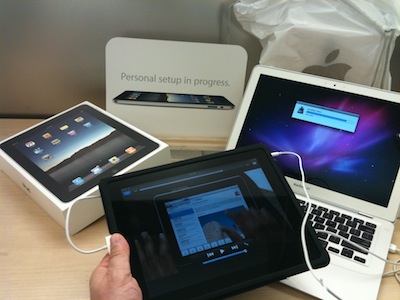
Setting up my iPad
WHY I BUY MAC: I didn’t buy an iPad because I’m a Mac Fan. For the record, I didn’t buy a Mac because I’m an Apple Fan. People forget I was once a Mac user who converted back to PC when Macs ceased to be the best solution for my ministry. (When Windows 95 came out, it was better than my OS Classic Mac) I converted back to Mac again when OS X came out. I am a Children’s Ministry Fan and Productivity Fan and Efficiency Fan and a Don’t Waste My Time With Viruses and Stupid Errors and Pop Ups and Spyware and Stuff That Just Plain Doesn’t Work Fan.
The reality is, Apple is the company that knows what they are doing and the iPad is just the lastest in a long line proving it. This thing is a beautiful piece of engineering genius. It is simply a dream to work on.
DO YOU NEED ONE?
That is a question only you can answer. For me, I run an IT company with employees and volunteers all over the country. Our main form of communication is e-mail. I manage multiple web-based databases and I am responsible for over a dozen websites plus social networking is a major part of my daily networking both personally and professionally. I do over half of this Mobily on my iPhone, and now can do it on my iPad instead of my cell phone. The iPad makes it much easier on the eyes as well as makes access quicker than a laptop. You will need to assess how much you access e-mail, the web, social networking, and the other apps available on the iPad and if instant access would be helpful to you.
*DO YOU NEED THE iPAD 3G? (AT&T vs. VERIZON)
I do NOT recommend you get the iPad 3G when it comes out. BAD IDEA!!! As someone who loves his iPhone let me warn you. AT&T service is TERRIBLE. It is the only thing I HATE about my iPhone. I usually hesitate to use the word hate, but not in this case. I don’t know what AT&T is doing with the millions of dollars they are making off iPhone users, but they aren’t spending it on cell towers. Coverage is terrible. I get dropped calls everywhere, even in highly populated places like airports and shopping malls! I will say, it is still worth getting an iPhone, unfortunately, because the iPhone IS that much more superior to ANY other phone, despite what other may say. The droid and other wannabees do NOT come close despite their claims. But I get dropped calls every single day no matter where I go.
So why oh why would I want to PAY to have an iPad by online with AT&T? NO WAY!
But there is another reason not to! It is foolishness to pay for ONE IPAD to be online with AT&T when with Verizon (who is has a GREAT NETWORK) you can have ANY FIVE DEVICES online regardless of whether they are iPads, or laptops or what!
That is what I have! I have a pocket MiFi card that allows my MacBook Air, iPad, and up to THREE MORE devices to ALL be online AT THE SAME TIME to be online! In fact, I can be walking in the mall, with my MiFi card in my pocket, with my iPad WiFi online, and I’m a Walking Walking Internet Hub! If I’m out, my wife’s iPad can be online too! If you are near me, I can give you the password and your iPad or laptop can be online too!
So, why would you pay to have ONLY your iPad be online with terrible AT&T, when instead you can have ANY 5 devices (or your choosing) be online with reliable Verizon at any time anywhere? It’s awesome!!
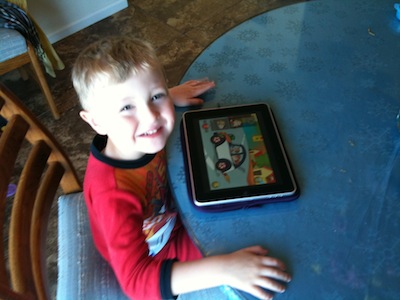
Even Luke loves the iPad!
I’m still getting to know my iPad and exploring all its potential – but so far – I’m impressed!
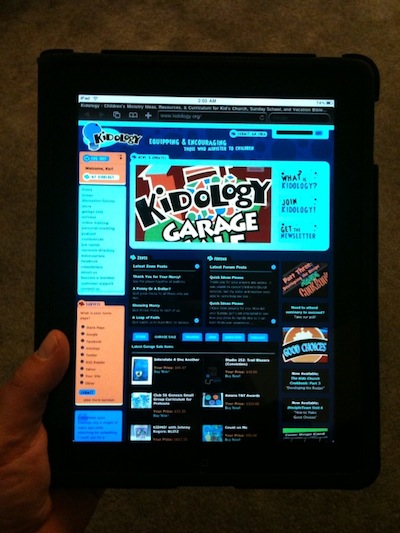 COOL TIP: Go into settings and under Accessibility go to Triple-click Home. Choose White on Black. Then, any time you click the home button three times quickly, it will turn the screen into negative resolution. (Repeat to go back to normal) It is designed for night reading, but it just looks cool. (Its also a good prank to play on someone who has an iPad if you can get your hands on their iPad and do this to them! FYI: Control-Option-Command-8 will do the same thing on your Mac! Go ahead, try it!) Have fun!



Thanx for the review! My son counted up his money again last night and he has enough – so we may be off to the store today! (But i think he’s sad to see his money go, so we’ll see)
.-= Dave T.´s last blog ..Honor – Feb 21 =-.
Thanks for the info as usual you always do such a great job of giving nuggets to all your readers. I really enjoyed the reminder of being an “Effieciency, Productivity” fan and not just a mac fan. But Apple does accomplish these things the greatest at this point, and they have my support as long as they do.
Thanks also for the verizon MiFi card.
I was just wondering about the IPad not being able to handle websites that use flash? Is that true?
Sounds great and eventually I will get one. Thanks for the review. I always appreciate them.
.-= Melissa´s last blog ..WW UPDATE =-.
Melissa, yes, that is true of all Apple portible devices. For reasons I won’t get into here, Apple and Adobe (the creators of Flash) can’t seem to get along. That is a downside to the iPad, and it impacts toyboxtales.com where most of our videos are flash.
Just discoved I can’t edit my Word Press blog in Safari on my iPad. I can log in and get all the way to the edit box, but then can’t actually get a cursor in the text box to type. Huge disappoint. However, there are apps to edit blog, but current they don’t work with our hosting configuration, so until we resolve that, I can’t edit my blog on my iPad. :(
I will challenge your multi-tasking comment, that we really don’t need multi-tasking. I’d say that based on the applications you’ve used, YOU don’t seem to need multi-tasking. I love Pandora radio and when traveling, I’ll listen to Pandora plugged into the sound system of my car. Then when I needed to check Google Maps to see where I was going, I couldn’t listen to the radio. That’s multi-tasking fail. I understand why apple has drawn the line. Apple wants to have a “simple” device where all users have a positive experience. Multi-tasking is taxing on battery life and they don’t want people who don’t understand this to have a bad experience because they have 7 apps running at the same time and the battery only lasts for 2 hours. If only they had a “noob” button… and option where we could opt out of using it the way Apple says we have to run it and let us use it they way we want to. I just want to listen to my Pandora radio and have my maps running at the same time. The only option that really leaves me is to jailbreak, which I’m not always so comfortable doing.
Apple makes a great products. Their only flaw is how only they know best how I want to use their device. It works 90% of the time. However, that other 10% drives me crazy.
BTW, I’m sure I’ll wait to the next version… when they figure out the camera thing… and flash… if they ever work that out. :)
Thanks for the review, Karl. Now I have the itch even more! Gonna head to the Apple Store when I get back to Baton Rouge to get my hands on one of these in person. I may be following you into the early-adopter stance for this thing.
The MiFi sounds pretty cool, actually. I hadn’t heard of that before. Gonna have to research it and see how expensive it is.
Karl, I am somewhat disappointed in your initial skepticism, but this post makes up for it ;) Just kidding! Thanks for the review. It’s nice to see that the faith I had when the product was announced regardless of the negative response was well put :) I can’t wait to get my hands on one. I have to live vicariously through my friends who are able to get one ;) Hint, hint, nudge, nudge…
.-= Henry Zonio´s last blog ..Video Review: “Pistachio, The Boy That Woodn’t” by VeggieTales =-.
Kenny, I’m with you on Pandora – I do wish I could have Pandora playing in the background, that would be sweet! Perhaps in time they will at least allow 1 app to run in the background or have a way for a “swap” processor feature like my cable has a swap so you can record two channels at the same time. I guess you’ll just have to run Pandora on your iPhone while working on your iPad, that’s my solution! :o)
BTW, Karl, just a quick comment about your AT&T frustrations. I hear this a lot on the internets. AT&T has a really bad reputation. I can’t say I blame folks in areas where their coverage is bad and they drop calls so often. It seems to mostly be really large metropolitan areas where I hear this (e.g. LA and NYC). I was surprised to hear you had the same issues there in Colorado.
For the record, down here on the Gulf Coast, I have been quite happy with AT&T’s service for several years now. I hardly ever have dropped calls. That doesn’t mean I’m an AT&T fanboy (like I am for Apple products), and I’ll gladly change to a better/cheaper service once AT&T loses exclusivity rights on the iPhone. But, just so you know, it appears to me that the problems AT&T has with calls dropping are location-specific, and I just lucked out in that department.
Josh, on AT&T – first of all, my bad experience is not limited to Colorado, it is EVERYWHERE I GO, and I travel extensively all over the country, and it happens in populated areas and in remote areas, and is in STARK contrast to Verizon who gave me 99.9% coverage even when I was in remote areas of Yosemite or Alaska! Also, are you on an iPhone? I think the terrible AT&T service is limited to iPhones, everyone who counters my complaints are usually not on iPhones – so I think that there is an issue with iPhones that Apple won’t own up to. As everyone I know personally that has AT&T and doesn’t have an iPhone says AT&T is great. So I really think it is an AT&T/iPhone issue.
Did you buy any ipad accessories?
The only accessory I got was the Apple case. Not many accessories are available yet. They had a VGA adaptor, but I won’t be using this for presenting, I’d still rather use my Macbook Air in a workshop because of the all other capabilities I might want during a workshop. But I know many cool gadgets are coming!
Dude, I too wear a brown fedora. That is really scary. Good thoughts! I haven’t heard of the mifi what is it?
And I wear a black fedora for my magic shows! The mifi card is described in the post, that’s what it is; a broad band card that is also a wireless access point that allows up to 5 devices to be online wirelessly for the same monthly fee, and its the size of a credit card! You can plug it into your usb port (then it isn’t wireless) or just use it on battery, or plug into outlet. It is amazing!
Pastor Karl,
Could you not use the WordPress app on your iphone to update your blog?
You just need to have Settings –> Writing –> XML-RPC selected.
Hope that helps! I love the review and I hope the battle between Adobe and Apple regarding Flash gets solved. I think HTML 5 is still a few years down the road in regards to full browser support/ etc. etc.
Justin, no, I can’t. It works on every pickin’ WP blog Kidology has except this one… and all the kings horses and all the kings men, can’t seem to figure it out. ;) We have all the tech guys workin’ on it, and they are all stumped. So we are actually setting up a whole new blog and database on this site to experiment. We’ve upgraded WP, and tried some other things, and nothing is working. I can mobile blog on toyboxtales, yosemitesummit and several other WP blogs I have access to, but not kidologist.com Hopefully we will figure it out soon. I’m DYING to have that ability. There is something fishy going on!
Karl,
How about blogging on your most used and favorite ipad apps. Please :)
You said “If I’m out, my wife’s iPad can be online too!” Do you mean if she is with you?
Yes, if she is with me. I can have up to five devices online within about a 250 foot radius.