

Well, I ranted last week on how STUPID MICROSOFT IS and got more comments than usual. So I am turning to my faithful blog readers for HELP!
First, let me get this off my chest: I HATE THE NEW OFFICE!!!
It’s stupidity just keeps showing up. This one, I can not solve. On ALL new documents, it adds space between paragraphs when you hit enter, and I don’t want that. Word never did that before unless you ASKED IT TO. Now, you have no choice. You can manually go in and change it every time you make a new document, but that is stupid. I should be able to make the default the way I want it – back to normal. There MUST be a way, but I can not find it. I can only find how to set default margins.
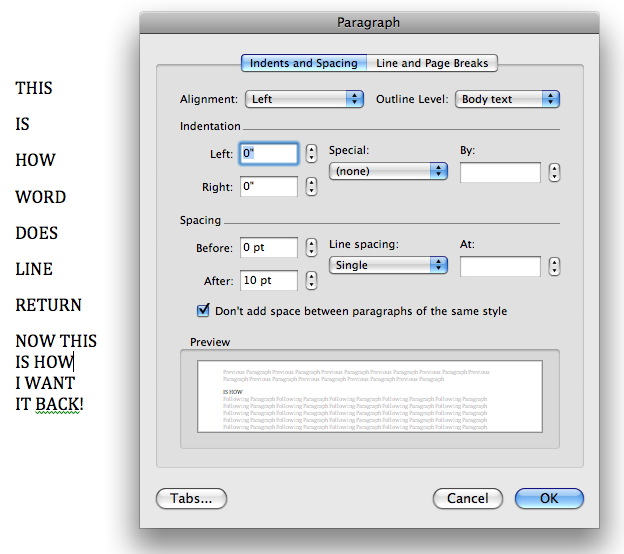
(Click to see larger image)
If you look at this screen shot you can see where you can go to Format / Paragraph and check “Don’t add space between paragraphs of the same style.” But I have to do this for each and every Word document I ever make for the rest of my life? I make hundreds a month!
PLEASE HELP ME SOMEONE!
How do I say to this lame non-Apple program, “Please don’t ever add space between paragraphs of the same style on this document or any other every again, and why did you ever start suddenly adding space?” Yes, in HTML that is standard, but not in Word documents. Word documents are not web pages. (Don’t even get me going on Word HTML!)
I’ll be so thankful if anyone can help me out. Otherwise, I need to reinstall the old version and throw $149 in the garbage. This has been such a horrible experience all around upgrading Office and reminds me again why I switched to Mac. Gee Whiz. Microsoft just doesn’t think anything through.
UPDATE: Henry is my Hero! (instructions on his site)