

Mac users – when you open your Finder, does it always open to that annoying “All Files?” Would you like it to auto-matically go to your Dropbox folder or Ministry Files? I set each computer to open right where I go 95% of the time to get files…. and home it’s my Dropbox Folder, at work, it’s my church files.
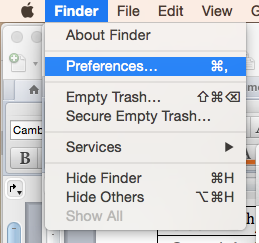
How? Open up finder and select preferences:
 And the under the General tab, look for New Finder windows show:
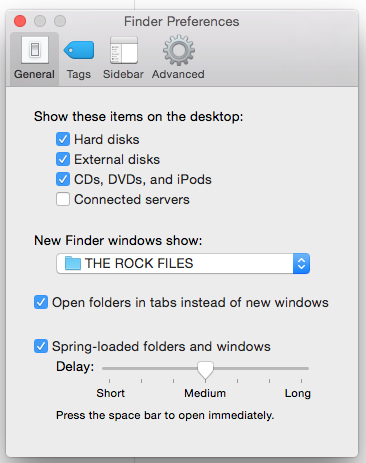 And select “Other” and navigate to the folder you want. Now, every time you open a Finder window – you’ll be there!
You’ll see above at work I want my Finder to always open right to my “Rock Files” instead all “All Files” then clicking on “Dropbox” and then navigating to the “The Rock Files” folder… when you are doing this countless times a day, this shortcut makes your time more productive.
Hope it helps! If you’d like more Quick Mac Tips, let me know, and I’ll post more.