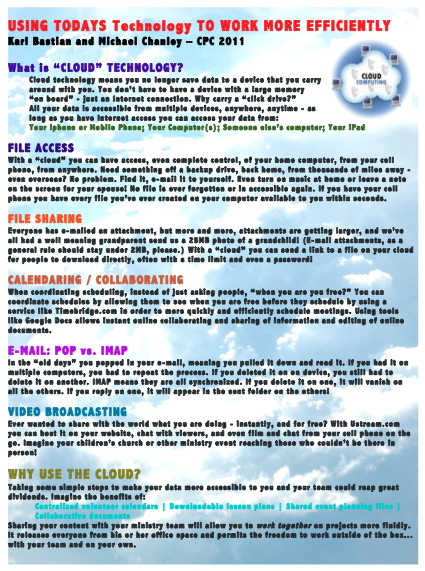
Cloud Technology – What Is It?

At CPC last week, I got to teach a workshop with Michael Chanley on technology – and it was a lot of fun! We bantered back and forth, live webcasted and confused half the room with everything we covered, but it was a blast! I demonstrated remote accessing my Macs back home as well as all my backup drives from my iPhone and iPad among other cloud perks and tried to answer questions on a wide variety of technology issues. I went over why Cloud Technology is so important – why it enables you to have access to all your data from anywhere from any device and never lose your data again, as well as the difference between POP and IMAP e-mail so your e-mail is all synced across all your devices. Plus we did webcasting with live chatting right from my iPhone – and showed how to do that for free and embed it on your website with live chat, also for free. (See it on my blog and Kidologytogo.org as well.) I’ve had a ton of requests for the workshop, so here’s what I’m gonna do. 1) Here is the PDF handout: DOWNLOAD HERE (668kb) 2) Here’s an…

Continue reading

Managing Multiple iPhoto Libraries

I have often been asked to blog about Mac Tips (since I know a LOT of Mac secrets!) Well, tonight I responded to a fellow Twitterer with some help with iPhoto and after sending the e-mail, thought I’d post it here just in case it helps someone else. QUESTION: How to you combine multiple iPhoto Libraries onto one drive and access each of them? I recently combined all my iPhoto libraries onto one external drive because I had multiple iPhoto Libraries and it was getting a little crazy: Macbook Pro (2003-2006, and 2006-2008, i had started over when it got too big) macbook air (used when I travel) mac mini (family photos) mac G4 (scanning old family photos) But I got to where I had to keep switching between machines or remember which machine had which photos. I finally wanted to get them ALL onto my Mac Mini since it has the massive monitor and a double decker external drive for back up. While there is no easy way I know of to combine them all into one library, I actually don’t think you want to, every time I hit 10,000+ photos in a library it gets slow, because, as…

Continue reading

Microsoft is Stupid

OK, I usually don’t rant on my blog, and don’t approve of blogs that rant all the time – but in this case, I can’t resist. Lately, I’ve had people send me Word documents that ended in .docx and have had a LOT of trouble opening them and have had to send them back and forth trying to get them to save in different formats and whatnot so that I could view them thinking they were using some archaic version of Word – harking back to the old days when Mac and PC files were not compatible when today they are perfectly compatible. Well, this week I upgraded to Office for Mac 2008 and discover the problem is STUPID MICROSOFT and these friends of mine were not using some old outdated version but the latest stupidity of the so-called cutting edge computer company. I went to save a document and the default is this lame .docx which means that if I need to send the file to anyone who hasn’t upgraded they won’t be able to open it. HOW DUMB IS THAT? So now every time I save a document I have to manually ask to save it as a…

Continue reading

Kidologist.com RSS Widgit

Brought to you by evenmoremac.com: (originally posted here, but now updated with search field!)   DOWNLOAD HERE (512kb) If you have a Mac, you’re in luck! Thanks to Super Mac Expert Chad Gilchrist (and fellow Mac Nerd) you can have your on handy dandy Mac Widget and see my new blog posts via a custom widget! Thanks Chad!

Continue reading

Kidologist.com Widget Released

Thanks to my mac-genius buddy Chad over at: I now can offer my Mac usin’ blog readers a very cool Kidologist.com RSS Mac Widget: Just DOWNLOAD HERE, then open the ZIP file and double click on the file that looks like this: It will ask if you if you want to install the widget, and, of course, you say YES! Download Details Version: 1.0 License: Freeware File Size: 396K System Requirements: Mac OS X 10.4 or later     THANKS to Chad for making this cool Mac widget for me! This kid’s got talent! For Mac tips, tricks and advice, be sure to visit Chad’s Mac Blog.

Continue reading