

Wondering how to deleting all photos and videos from your iPhone?
In Summary: If you’re running low on space, use this technique to clean out your iPhone quick
If you are like me (and I know I am!) I am shooting pics and video on my iPhone daily. People are often shocked when they spot that I have 4000+ photos on my iPhone in the Camera Roll, not counting the ones in albums.
The other day I was at Walt Disney World shooting family memories like I normally do, when my iPhone suddenly alerted me to the fact that I was out of space. I was shocked considering that I have the iPhone 4S with 32GB of space! So that I could finish recording what I wanted, I did some emergency deleting of large apps I hardly use, (the iPhone kindly gives you a quick button the place to remove files and apps to get space fast).
I know the culprit of my space problem is photos and videos. Nearly half my space is taken up with all these pictures and videos! The problem is, when you import pics/vids to your iPhoto, while it gives you the opportunity after import to “keep or delete” if you opt to keep them (as I do) you are then stuck with them. I’ve tried going back and deleting bad or unwanted pictures, but what to do NOW that I have over 4000 pictures? That would take a VERY LONG TIME!
I have found the solution!
If you’re not familiar with the process (I wasn’t), you use the application Image Capture on your Mac. The nice thing about this process is that it uses a program that ships on your Mac from the start–in other words, FREE!
Here’s what you do:
Plug your iPhone into your computer
Open Image Capture
Created a new folder for the photos to go into
Check the box “Delete after import”
Click “Import All”
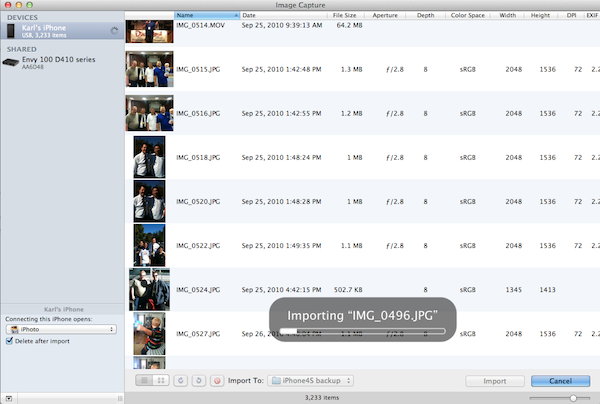
You will have a copy on your harddrive of ALL your pics/vids and your iPhone will be empty. You can then import that folder into iPhoto to make sure you aren’t missing any (checking “ignore any duplicates”) and then burn that folder to a CD for a backup and then delete it. (They are all in iPhoto after all!)
It’s good to have a fresh start after all.
If there are pics you want to have on your iPhone, simply put them in albums and sync those albums on your iPhone, and you’ll have them with you. No need to carry all of them with you all the time.
I plan to do this again about every six months now.