One of the Coolest Hidden Mac Tricks

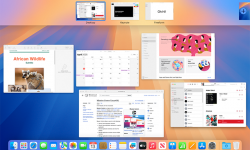
I could not live or work without Mac “Hot Corners” – once called Expose’. How do you navigate to your desktop when it is loaded with windows? Minimize them all one at a time? That’s for people with too much time on their hands. Mac has a very handy and cool feature called “Hot Corners” – as I set up a new Mac I was reminded quickly how much I use this! Instructions: Click the  Apple menu (top-left). Go to System Settings. Click Desktop & Dock. Scroll allll the way down (it’s hiding like a shy volunteer). Click Hot Corners… Pick a corner and set it to Mission Control (shows all windows), Desktop, Application Windows, etc. Click Done and enjoy feeling powerful. My Set Up: Move my mouse to lower right it shows ALL windows, upper right just the application you are in, such as Word. Lower left I set to Desktop, and BONUS TIP, you can click and hold on a file, drag to lower left, desktop appears, and then drag to where you want to drop it. OR, go to Desktop, grab a file, and then go to Mission Control – never dropping the file – and…


Continue reading

Oh, You Sexy Document!

Sexy Document

Let’s be honest, “Document Management” isn’t the first thing that comes to mind when you think of excitement. But in our digital age, where files are constantly emailed back and forth, edited by multiple people, and frequently updated, effective document management is essential. Without it, things can quickly spiral into chaos – and nobody wants that. That’s why the 6th video in my Ministry Management series is Master Your Documents! (No More Chaos!). This video will help you bring order to the madness. We’ve all felt the frustration of searching for the latest version of a file or losing important work due to computer errors. But did you ever notice that the letters in the word LIFE can be rearranged to spell FILE? Sometimes, it feels like managing documents is all we do! Without a solid strategy, managing countless virtual files can be overwhelming. In this training, I’ll cover how to organize your files effectively and keep them on T.A.S.K. (a strategic approach to managing your ideas). I’ll also dive into the S.A.F.E. method, which outlines four key strategies for protecting your valuable documents and ideas. Plus, you’ll learn a unique document naming protocol (Oooo, doesn’t that sound sexy?!) that…

Continue reading

Check-in Without Lines?

Imagine computer check-in without computers! Imagine secure check-in without lines. Sound impossible? Not any more. Thanks to the always innovating geniuses at KidCheck, secure check-in is getting even easier. As you can tell by the related links below, I’ve been an avid supporter and promoter of KidCheck for years. I love how they are always innovating to make child security easier and more effective each year. While other systems provide the basics – KidCheck continues to add features and benefits that not only provide a pick-up label, but improve communication between parents, volunteers, and leaders. AND NOW… (wait for it) … They have introduced Express Check-in. That means parents can check-in on their smart phone in the parking lot or while walking it, come to your check-in area, hit “PRINT” and be on their way to dropping off their kiddos without every standing in line or typing into a computer. Learn all about KidCheck Express Check-in Here. As I mentioned on my podcast today, the safety of kids is of the utmost importance to parents. When you have a secure check-in area, you score points with parents who want to have the peace of mind that their child is not…

Continue reading

Get a Cue! (and other recommended Apps)

If you are looking for a simple and kinda cool way to get an overview of your day – and doing some planning for the year, I just stumbled upon a cool new App you might enjoy. It is called Cue, and it links you calendar, contacts, Facebook, Google, Yahoo, or whatever accounts you might want to link into a single simple view of your appointments and events for the day. It’s a pretty slim and sleek way to see what’s important for the day. Also discovered, is a free Office App called CloudOn – integrates with DropBox. Looks very powerful and helpful. Worth a look! If you have found some great new apps for 2013, let me know in comments below! My favorite GAME is Air Wings! If you are in Game Center, my username is Kidologist, friend me, and I’ll blow you out of the sky! I look forward to playing you, or hearing what awesome apps you plan to use to help you be more productive or successful in 2013!

Continue reading

In Case of Fire…

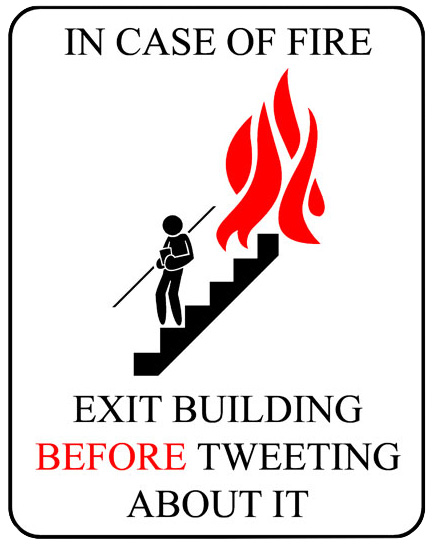
My sister posted this to my Facebook Wall. For some odd reason, it made her think of me… My reply was: No way! You’ve got to tweet it, post twitpic images, update your Facebook status, check into Four Square friends to see if any of your friends are in the building too, post a video of the fire to YouTube and do a blog post discussing your thoughts on the cause of the fire and the general lack of safety in the building, and THEN exit! But it did make me laugh, (and think). Truth me told, I might try to pull off a tweet on my way out of the building. (If I could do so safely, of course! And if I could do so without endangering anyone else, of course!) But do we tweet and facebook too much? Certainly! I sometimes wonder if when Jesus returns, Christians will miss it because they will all be looking down at their cell phones Tweeting: Jesus is here! #secondcoming Betcha wish you’d accepted Him? #heaven #hell #salvation #toolate #John316 Jesus will be yelling, “Hey! Look up! I’m here, time to put the cell phones down!” Ten bucks, there is no Internet…

Continue reading