One of the Coolest Hidden Mac Tricks

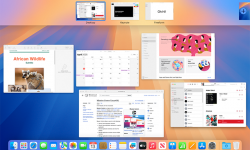
I could not live or work without Mac “Hot Corners” – once called Expose’. How do you navigate to your desktop when it is loaded with windows? Minimize them all one at a time? That’s for people with too much time on their hands. Mac has a very handy and cool feature called “Hot Corners” – as I set up a new Mac I was reminded quickly how much I use this! Instructions: Click the  Apple menu (top-left). Go to System Settings. Click Desktop & Dock. Scroll allll the way down (it’s hiding like a shy volunteer). Click Hot Corners… Pick a corner and set it to Mission Control (shows all windows), Desktop, Application Windows, etc. Click Done and enjoy feeling powerful. My Set Up: Move my mouse to lower right it shows ALL windows, upper right just the application you are in, such as Word. Lower left I set to Desktop, and BONUS TIP, you can click and hold on a file, drag to lower left, desktop appears, and then drag to where you want to drop it. OR, go to Desktop, grab a file, and then go to Mission Control – never dropping the file – and…
Continue reading

Quick Mac Tip: Get to your files faster

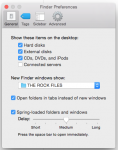
Mac users – when you open your Finder, does it always open to that annoying “All Files?” Would you like it to auto-matically go to your Dropbox folder or Ministry Files? I set each computer to open right where I go 95% of the time to get files…. and home it’s my Dropbox Folder, at work, it’s my church files. How? Open up finder and select preferences: And the under the General tab, look for New Finder windows show: And select “Other” and navigate to the folder you want. Now, every time you open a Finder window – you’ll be there! You’ll see above at work I want my Finder to always open right to my “Rock Files” instead all “All Files” then clicking on “Dropbox” and then navigating to the “The Rock Files” folder… when you are doing this countless times a day, this shortcut makes your time more productive. Hope it helps!  If you’d like more Quick Mac Tips, let me know, and I’ll post more.

Continue reading

Cleaning Out Your iPhone Pics

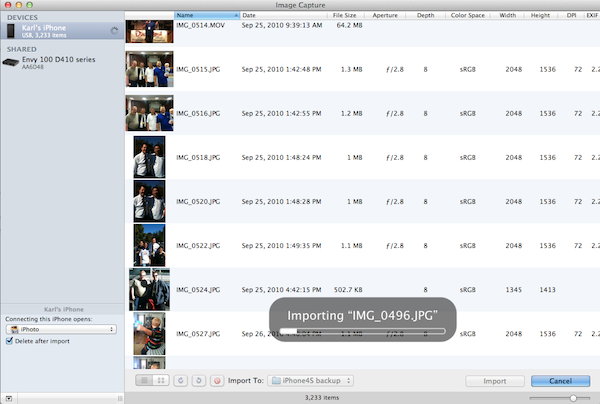
Wondering how to deleting all photos and videos from your iPhone? In Summary: If you’re running low on space, use this technique to clean out your iPhone quick If you are like me (and I know I am!) I am shooting pics and video on my iPhone daily. People are often shocked when they spot that I have 4000+ photos on my iPhone in the Camera Roll, not counting the ones in albums. The other day I was at Walt Disney World shooting family memories like I normally do, when my iPhone suddenly alerted me to the fact that I was out of space. I was shocked considering that I have the iPhone 4S with 32GB of space! So that I could finish recording what I wanted, I did some emergency deleting of large apps I hardly use, (the iPhone kindly gives you a quick button the place to remove files and apps to get space fast). I know the culprit of my space problem is photos and videos. Nearly half my space is taken up with all these pictures and videos! The problem is, when you import pics/vids to your iPhoto, while it gives you the opportunity after import…

Continue reading

Day 4 – Thankful for Photography

This is part of a series called 24 Days of Thankfulness. These posts are in RANDOM order, NOT priority order. Each is something I am thankful for leading up to Thanksgiving. DAY #4: Photography I am thankful for the gift of photography. Anyone who follows my blog knows that I love worshiping through my lens and post pictures all the time on this site. (often wallpapers and videos) I can’t imagine a world where we could not capture life and memories to look at later. Imagine all that we would forget if we didn’t have pictures to look to bring back the buried memories? I am so thankful that we can now carry camera on our phones (even video cameras!) so that in a mere moment we can capture memories, beauty and fun moments to treasure for the rest of our life and then pass down to our family’s future generations. While it can be a lot to manage – it is a treasure. If you are not on a Mac, it’s a lot harder to manage all your pictures! If you are on a Mac and iPhoto is getting a little overstuffed with photos, did you know you can…

Continue reading

24 Days of Thankfulness

Today I launched a little Thanksgiving Project over on Kidology.org called “24 Days of Thanks-Giving” – basically I am providing a simple Word doc you can download and every day from Nov. 1 until Thanksgiving add ONE thing you are thankful for. It’s really just something I need to DO MYSELF – but I thought maybe others might want to join me, and I’d enjoy reading/seeing what others are thankful for. So you are welcome to use the Word doc, or just post in the forum what YOU are thankful for! So let me begin today, with my first post. These are NOT going to be in priority order, otherwise I’d have to go God, Family, etc. and then later on, people might judge me for putting one thing “above” or “before” another – so right out of the gate let me say, these posts will be in RANDOM ORDER of things I am THANKFUL FOR! DAY 1 – Yosemite DAY 2 – God’s Word DAY 3 – My Mom DAY 4 – Photography DAY 5 – Pandora DAY 6 – George Lucas DAY 7 – Breckenridge DAY 8 – Barq’s DAY 9 – Mercy & Grace DAY 10 –…

Continue reading